

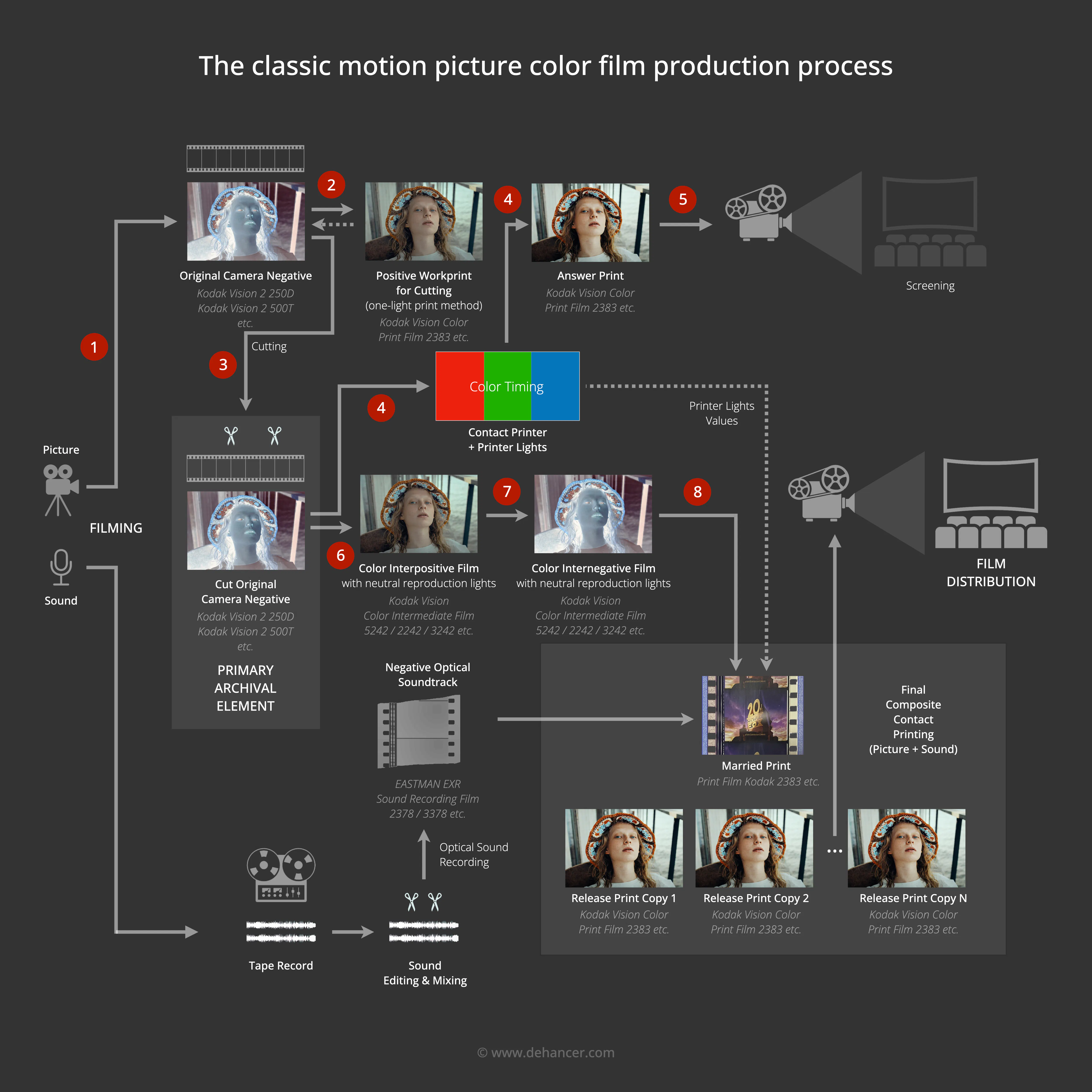
The classic processes of motion picture production are well covered in specialized publications. However, we were unable to find a clear, comprehensive diagram that would illustrate the key stages of analog filmmaking and be accessible to film enthusiasts and colorists who routinely work with digital embodiments of these processes.
We therefore took it upon ourselves to create such a diagram and accompany it with detailed commentary. Our primary focus is color motion picture production, since black-and-white filmmaking follows essentially the same workflow.
In developing this diagram, we drew on technologies pioneered and refined by Kodak through the 1970s-1990s - a period widely regarded as the golden age of photochemical cinema. Kodak's technologies set the industry standard and served as a benchmark for other film stock manufacturers and equipment makers worldwide.
An understanding of the classic, fully analog process of creating a color motion picture is valuable above all to professional colorists working with color in contemporary cinema. The digital film industry actively draws on the aesthetic heritage of analog filmmaking and continually faces the challenge of emulating analog motion picture and photographic materials - a task that demands a solid understanding of the original processes.
This knowledge is equally useful to cinematographers, photographers, content creators, and anyone interested in film aesthetics and its application across creative and professional disciplines.
The diagram describes the image workflow in relative detail and touches only briefly on the sound production pipeline. Film sound is a separate, extensive subject that lies beyond the scope of this publication.
Our diagram also does not cover the hybrid workflow in which a film is shot on celluloid, then scanned and processed with digital tools, and sometimes output back to film. Our goal is to examine the classic - that is, fully analog - process of creating a color motion picture.
The classic motion picture color film production process
Let us walk through the diagram. The numbered stages represent the key phases of motion picture production:
1. Filming
The classic process encompasses the entire production cycle - from principal photography, editing, and color timing through sound mixing and the creation of projection copies for theatrical exhibition. Production typically begins with shooting on color negative film stock, such as Kodak Vision 2 250D, Kodak Vision 3 500T, and others.
2. Printing the positive workprint
The exposed scenes must be reviewed and assembled into a cohesive film. To accomplish this, the original camera negatives are contact-printed onto print stock to produce a positive image for preliminary viewing. Since no creative color timing is required at this stage, the negatives are printed using a one-light method - a single, averaged exposure setting for the entire roll, without scene-by-scene color correction - onto the same release print film (print film) used for final copies: for example, Eastman Color Print Film 5384 in earlier decades, or Kodak Vision Color Print Film 2383 from the late 1990s onward.
As a cost-saving measure, workprints are sometimes printed on expired or older batches of print stock. The resulting positive is used solely for internal purposes - screening the shot material and creating an edit decision list. It serves no other function and plays no further role in the production chain. Meanwhile, the original camera negative is preserved from mechanical damage and wear.
3. Conforming the original negative
Once the edit is approved, the original camera negative is physically cut into the required segments - matching the edit marks on the positive workprint - and spliced together. At this stage, titles are also prepared as separate strips of film, either spliced into the negative (for titles on a standalone background) or kept separate (for titles that will be optically superimposed over a scene). The result is the conformed original negative - the primary archival element of the film - plus a set of title elements for subsequent burn-in.
4. Color timing
To give the film its finished look, the conformed original negative must be printed onto release print stock (print film) - for example, Kodak Vision Color Print Film 2383 or an equivalent.
Print films exhibit relatively high contrast and a pronounced visual character, so color timing parameters are adjusted individually for each scene, taking into account the characteristics of both the original negative and the print stock.
The process of technical and artistic color correction in the analog (photochemical) process is known as color timing. At this stage, the film's final color is established. Printing is carried out on a contact printer, and the output of the timing session is a set of printer lights - RGB filter densities, exposure values, and other parameters - keyed to the edge numbers (key numbers) of individual scenes. These identification codes are printed along the film's edge in the perforation area by the manufacturer during coating and serve as the primary reference system for locating specific frames on the negative.
Titles are also burned in at this stage, since color timing is performed with them in place.
5. Screening the answer print
To evaluate the resulting color treatment of the film and its individual scenes, the printed reel is screened in a theater - under the same projection conditions in which the finished picture will be shown to audiences.
During the screening, adjustments are noted and incorporated into the printer lights, after which a new print is made. This cycle is repeated until the desired result is achieved, typically over the course of 2--5 iterations.
To protect the conformed original negative, contact printers are equipped with soft film transport mechanisms and polished contact surfaces. In some cases, wet-gate printing is used - a process involving a special liquid that simultaneously protects the negative, acts as a lubricant, and optically conceals surface scratches. The number of printing passes is kept to a minimum: wherever possible, only individual scenes are reprinted, and alternate takes are sometimes used for timing tests to disturb the original negative as infrequently as possible.
6. Printing the interpositive
Once the color timing is finalized, a preservation copy of the conformed original negative must be created in order to print a large number of release copies without subjecting the original to repeated mechanical stress. After this stage, the original negative is placed in archival storage.
Producing a duplicate negative requires an intermediate positive step (interpositive), since the process involves a double inversion of the image: negative → positive → negative.
The interpositive is printed on special intermediate film stocks with relatively neutral contrast and color reproduction characteristics - for example, Kodak Color Intermediate Film 5242 / 2242 / 3242 or equivalents.
7. Printing the internegative
The interpositive is then used to print the required internegative - a technically faithful copy (as close as the process allows) of the conformed original negative. The internegative is printed on the same relatively neutral intermediate stock, such as Kodak Color Intermediate Film 5242 / 2242 / 3242 or an equivalent.
The number of internegative copies corresponds to the scale of the release and its logistics (print runs may be carried out at different laboratories in different cities and countries). On average, a single internegative can yield approximately 300 high-quality release prints.
8. Printing release copies
The final printing stage. The internegatives are printed onto release print stock (print film) - Kodak Vision Color Print Film 2383 or an equivalent - using the printer lights established during color timing (step 4). Titles are also given their final burn-in at this stage.
The release prints additionally receive an optical soundtrack, printed as a separate track. The sound passes through its own production cycle of recording, preparation, dubbing, processing, editing, and printing of an intermediate sound negative on specialized stock such as EASTMAN EXR Sound Recording Film 2378 / 3378 or an equivalent.
The end result is the required number of fully edited, color-timed release prints complete with sound and titles.
Theatrical distribution
The prints are shipped to theaters. A single feature may span several reels of film. Depending on the theater's equipment, the film is either shown reel by reel or spliced into a single continuous strand for platter projection.
Film Emulation in the Digital Domain
From the standpoint of emulating the film look in digital cinema, the stages that matter most are those marked 1 and 4 on the diagram. In step 1, we choose the negative stock we are "shooting" (i.e., the stock we are emulating). In step 4, we choose the print stock on which the film is "printed" (i.e., the print we are emulating). These two stocks, together with the color timing applied during printing, define the colorimetric signature of the film. The remaining stocks and stages in the analog pipeline are purely technical and have no bearing on the final image.
The general formula for film emulation therefore always takes this form:
Digital Image + Film Stock + Print Film
The Print Film component may sometimes be omitted - for example, when emulating a hybrid workflow in which the original negative is scanned and all subsequent work is carried out digitally, without optical printing (and therefore without print emulation).
More often, however, when emulating motion picture film stocks (as opposed to still photography or other analog materials), virtual printing onto a release print stock is employed. The classic process calls for the negative to be interpreted through optical printing, and it is at this moment that the chosen negative stock is fully "revealed," expressing the aesthetic potential built into it by the manufacturer.
A few examples of classic Film Stock + Print Film pairings:
- Kodak Vision 3 250D + Kodak Vision Color Print Film 2383
- Kodak Vision 3 500T + Kodak Vision Color Print Film 2383
- Fujicolor Reala 500D + Fujicolor Eterna-CP 3513
These and other film stocks are available in Dehancer Pro for DaVinci Resolve, Adobe Premiere Pro, Adobe After Effects, Final Cut Pro, and Baselight, as well as in Dehancer Film for Adobe Photoshop, Adobe Lightroom, Adobe Camera Raw, Capture One, and Affinity Photo, and in the standalone Dehancer Desktop application.

A distinct advantage of digital film emulation is the ability to create print combinations that would be impossible or impractical in the analog domain. For example, Dehancer allows you to "print" a positive (reversal) motion picture stock onto release print stock Kodak 2383. You can even "print" onto an entirely different medium - such as a Polaroid instant print, which is itself already a finished print.
One might debate the correctness of such "printing," but as a creative tool it opens up genuinely new possibilities. Even with unconventional stock-and-print pairings, quality is not compromised, since Dehancer emulates the underlying analog processes while minimizing the digital artifacts typically introduced by standard digital color correction tools - particularly when those tools make significant changes to the source color and contrast.
Returning to classic film process emulation: Dehancer offers the current Kodak Vision 3 family of color negative stocks, the primary Kodak 2383 release print stock, several Fuji motion picture stocks, and the classic Fuji 3513 release print stock. This selection is more than sufficient for faithful and convenient reproduction of virtually any motion picture color film production process.
For more information about the Dehancer project, its tools, and its film emulation processes, visit www.dehancer.com.
References
- Dominic Case, «Motion Picture Film Processing»
- Dominic Case, «Film Technology in Post Production»
- L. Bernard Happe, «Your Film and the Lab»
- D.J. Corbett, «Motion Picture and Television Film: Image Control and Processing Techniques»
- Kodak, «The Essential Reference Guide for Filmmakers» (H-845)
- Kodak, «Motion Picture Color Theory Workbook»
- Kodak Publication H-61: «ECN-2 Processing»
- Kodak Publication H-24.04: «Process ECP-2D»
- «American Cinematographer Manual» (ASC)
- Paul Wheeler, «Practical Cinematography»
- David Samuelson, «Hands-On Manual for Cinematographers»
- Steven Ascher & Edward Pincus, «The Filmmaker’s Handbook»
- T.H. James (ed.), «The Theory of the Photographic Process»
- R.W.G. Hunt, «The Reproduction of Colour»
- Raymond Fielding, «The Technique of Special Effects Cinematography»
Authors: © Pavel Kosenko, © Dmitry Novak, © Tadeusz Wojtowicz